


So, you want to add a cluster to a workload domain in VCF? Great! Just log in to your WLD vCenter, right-click the datacenter, and hit “New SDDC Cluster”, right?
Nope 😊
Turns out, things aren’t that straightforward—because that button? Yeah, it didn’t make it to the code. 🙃 But don’t worry, I’ll walk you through how to actually get this done in VCF 9.0.0 land.
Step 1: Commission Hosts (but not where you think)
You might think you need to commission hosts in your WLD’s vCenter. Logical, right?
Nope 😊
In VCF, hosts are always commissioned via the Management Domain, regardless of where you eventually want them. So:
- Go to your Management vCenter.
- Commission your new hosts under the Global Inventory Lists -> Hosts -> Unassigned Hosts.
- Use the network pool of your Workload Domain (or create a new one if needed).
Step 2: Add the Cluster (Spoiler: You can’t do it in the WLD vCenter)
If you’re thinking:
“I’ll just right-click the datacenter in my WLD vCenter and add a new SDDC Cluster like I do in the Mgmt Domain!”
You’re in for a surprise. That option… just isn’t there.
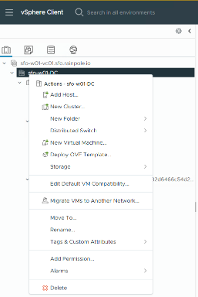
Why?
Because it didn’t make it into the code (yet). Yep, this is one of those “feature in transition” moments we all love so much.
So what now?
You’ve Got Two Options:
Option 1: Link your WLD vCenter to the Mgmt vCenter
Now that ELM is no longer supported in VCF 9, we’ve got a shiny new feature:
vCenter linking.
Check out this article for more on that vCenter Linking in VCF 9 – The New Shiny ELM
Once your WLD vCenter is linked to the Mgmt vCenter and you have common VCF SSO, you can log in to the Mgmt vCenter, navigate to your Workload Domain Datacenter and create your cluster in the WLD as expected.
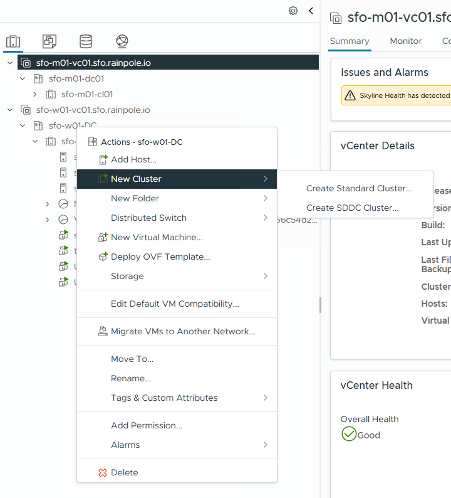
Magic. Kind of.
Option 2: Use SDDC Manager (Yes, it’s still a thing)
While the SDDC Manager UI is being phased out in places, some features still live there—and this is one of them. So let’s party like it’s VCF 5.x again.
Here’s how:
- Log into SDDC Manager
Use your Mgmt vCenter Admin creds. You know the drill.
- Navigate to Workload Domains
Click on the WLD where you want to add the cluster.
- Go to Clusters
Click Actions > Add Cluster
Yep, there it is! The Add Cluster button still lives here.
- Follow the Wizard
Select your commissioned hosts, configure networking, assign licensing, hit “finish,” and let VCF do its thing.
This will take a bit, so feel free to grab a snack or contemplate your life choices while you wait.
A Quick Heads-Up
This is just a temporary workaround. The ability to add clusters directly from the WLD vCenter is coming in a future release, so don’t get too attached to using SDDC Manager for this. Enjoy it while it lasts!
TL;DR
- Commission hosts via the Management Domain.
- You can’t add clusters from WLD vCenter (yet).
- Use vCenter Linking or fall back to SDDC Manager.
- Cluster added – life is good. 😊
Hope this helped you avoid a few hours of head-scratching. If you found this helpful (or at least mildly amusing), share it with your fellow VCF warriors.

- Help! I Joined the Wrong Identity Broker… (How to Unjoin an Identity Broker in VCF 9) - 15. September 2025
- Deploying a Three-Zone Supervisor in VCF 9.0.0 (Or: How I Learned to Stop Worrying and Love the API) - 31. July 2025
- How to Add a Cluster to a Workload Domain in VCF 9.0.0 (Yes, It’s Weird Right Now) - 30. July 2025
How is the VCF9 VDS design looks like, each cluster in a WLD domain get its own set of VDS or can they all share same VDS across a WLD domain.
VDS can be shared across clusters in a WLD.
Interesting. Our initial design was to use a dedicated VDS per cluster for vSAN, Service Console, and vMotion traffic, while leveraging a single shared DATA VDS across all clusters within the WLD domain. However, the VMware/Broadcom consultants we are working with have advised that this design is not supported.
Could you please share a Broadcom/VMware reference or documentation that explicitly supports or approves a shared VDS model across clusters within a WLD domain?