Terraform providers are widely used to provision infrastructure across diverse cloud environments. While Terraform originated primarily in the public cloud, many organizations now rely on it heavily for on-premises deployments as well. Because VMware Cloud Foundation (VCF) Automation exposes a Kubernetes-compatible API for resource provisioning, teams have traditionally been able to use the native Kubernetes Terraform provider to deploy vSphere Kubernetes Service (VKS) clusters. However, this approach requires writing Kubernetes-style manifests and nested YAML-like structures—a workflow that does not always align with how platform teams manage infrastructure elsewhere.
Most public cloud platforms offer dedicated Terraform providers with clean, declarative HCL schemas rather than raw Kubernetes manifests. For organizations operating multi-cloud environments, maintaining a consistent infrastructure-as-code (IaC) experience across both public cloud and on-premises environments is a top priority.
To address this need, Broadcom expanded the VCF Automation (vcfa) Terraform provider in version 1.2.0 (see the CHANGELOG.md for full release details). This update introduces native Terraform resources and data sources for VKS clusters alongside existing Kubernetes provider capabilities, giving customers the flexibility to choose whichever provisioning model best fits their operational workflow.
In this guide, we compare both approaches and walk through complete configuration examples. Throughout the post, kubernetes refers to the HashiCorp Kubernetes provider, and vcfa refers to the VMware VCF Automation provider.
Official Provider Documentation:
Terraform Manifest Architecture and Quick-Start Workflow
While Terraform project layouts can vary depending on team conventions, we used a clean four-file structure during testing to separate provider configuration, resource definitions, variable declarations, and environment-specific values:
- provider.tf – Defines required provider versions and connection parameters for authenticating to the VCFA environment. Taken directly from the VCFA in-product documentation, this file is identical for both the vcfa and kubernetes approaches.
- main.tf – Contains the core resource definitions for provisioning the VKS cluster. The structure and syntax of this file differ completely between the two providers.
- variables.tf – Declares all input variables required during provisioning. Because the vcfa and kubernetes examples use different variable schemas, each provider has its own variables.tf file.
- terraform.tfvars – Supplies environment-specific values for the variables declared in variables.tf. Any required variable omitted from this file will be prompted interactively by Terraform during execution.
If you are new to Terraform, follow these steps to run the sample configurations:
- Download the Terraform CLI binary (terraform for Linux/macOS or terraform.exe for Windows) from the HashiCorp Terraform Install page.
- Place the binary in a directory included in your system PATH (for example, /usr/local/bin or C:\Windows\System32).
- Create a dedicated working directory and copy the four manifest files (provider.tf, main.tf, variables.tf, and terraform.tfvars) into it.
- Update terraform.tfvars with the URL, credentials, namespace, and sizing values for your VCFA environment.
- Run terraform init to initialize the working directory and download the required provider plugins.
- Run terraform plan to preview the execution plan and verify changes without modifying infrastructure.
- Run terraform apply to provision the VKS cluster.
- Run terraform destroy when you want to tear down the deployed resources.
Finding In-Product Terraform Documentation in VCF Automation
Terraform is one of several programmatic ways to consume the VCF Automation API. As a result, built-in reference examples are available directly inside the VCFA portal under API Documentation / API Help Center.
In the VCF Automation Provider interface, you will find documentation and starter snippets for the vcfa provider. In VCF Automation 9.1.1.0200, the in-product guide links to the official HashiCorp Registry documentation for the vcfa_vks_cluster resource while providing helpful local examples for authentication and provider setup. In future I’d expect more focus on the vcfa_vks_cluster resource in the in-product documentation as well.

Navigating to API Documentation from the VCF Automation Provider portal user menu.

In-product Terraform Provider documentation and starter configurations in the Provider API Help Center.
If you are looking for examples using the kubernetes provider and Supervisor-level Kubernetes resources, log into an All-Apps Organization (all-apps-org) and open its API Help Center. I had to tailor especially the terraform code for vks clusters. See my examples below which should help you getting the right syntax.

Accessing the API Help Center from an All-Apps Organization.
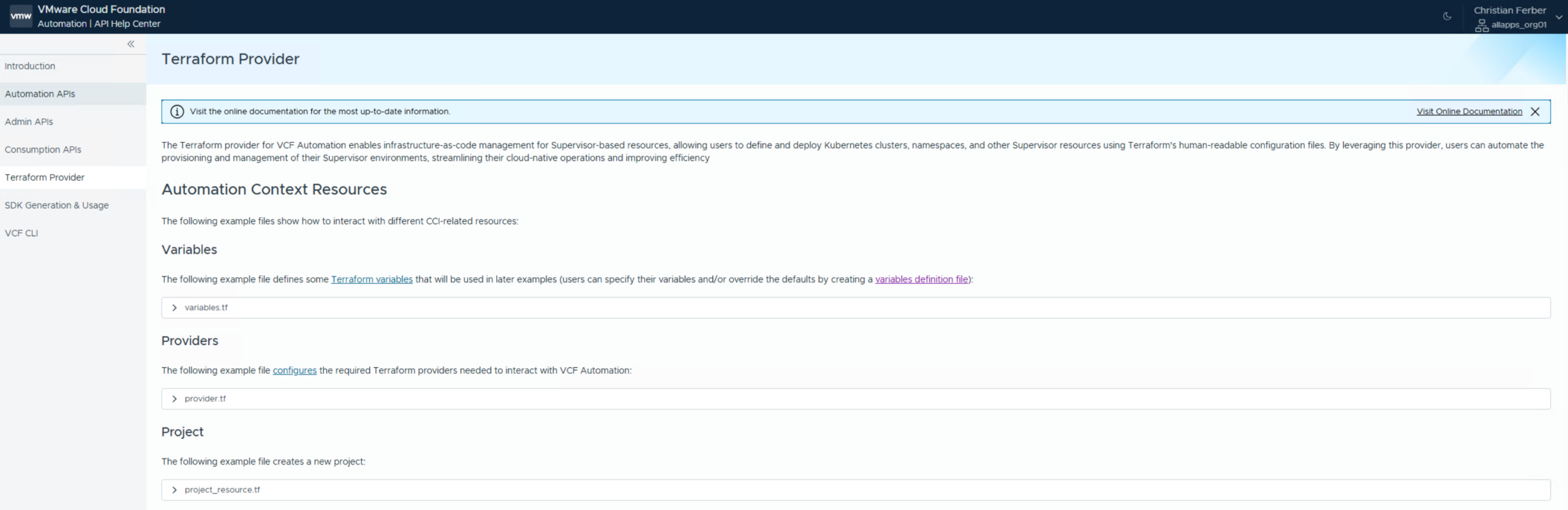
Supervisor and CCI Terraform examples available inside the All-Apps Organization API Help Center.
Comparing the vcfa and kubernetes Providers in Practice
The primary difference between the two providers lies in how manifests are authored and how state changes are presented during execution. Both providers inspect the live state of a VKS cluster, compare it against your desired configuration, and display pending updates during terraform plan. In day-to-day usage, however, the vcfa provider offers a noticeably cleaner experience—it follows standard HCL conventions, avoids deeply nested Cluster API boilerplate, and produces much easier-to-read plan output.
Initial Cluster Creation Output
The screenshots below show terraform plan and terraform apply when deploying a VKS cluster with the kubernetes provider:

Execution plan generated by the kubernetes provider showing the nested Cluster manifest.
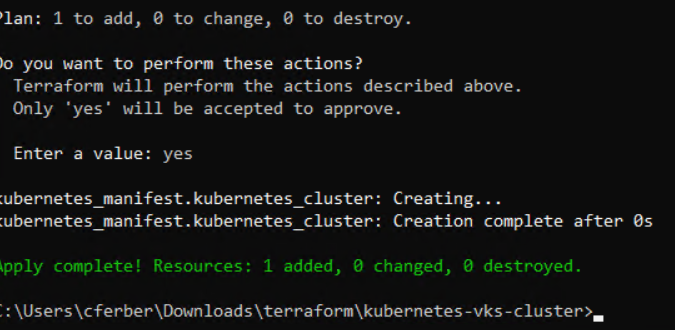
Successful VKS cluster creation using kubernetes_manifest.
For comparison, here are terraform plan and terraform apply performing the exact same deployment with identical cluster parameters using the native vcfa provider:

Execution plan generated by the native vcfa_vks_cluster resource.
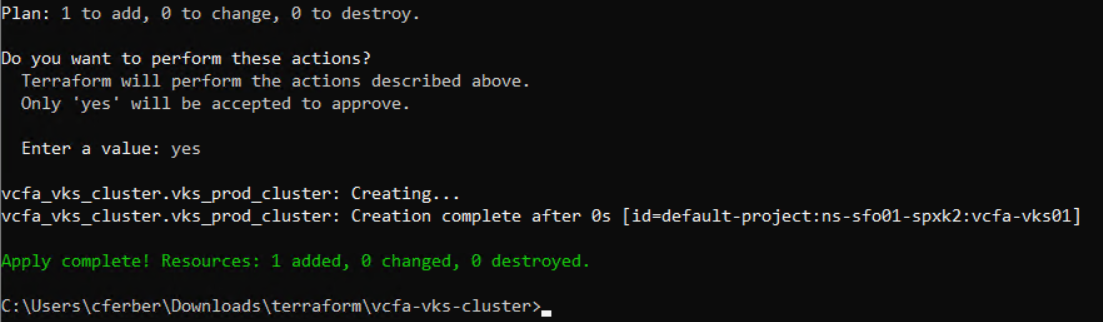
Successful VKS cluster creation using the vcfa provider.
Drift Detection and Configuration Updates
To evaluate how each provider handles out-of-band drift and declarative updates, we introduced two changes to an already deployed cluster:
- Out-of-band scaling: Scaled the worker node count directly on the cluster from 1 to 2 without modifying the Terraform files.
- Manifest variable update: Changed the VM class in terraform.tfvars from best-effort-medium to best-effort-large.
Both providers accurately detected both the manual drift in the live cluster and the updated variable in terraform.tfvars, reporting the exact reconciliation actions required on the next terraform apply:
Drift and change detection with the kubernetes provider:

The kubernetes provider detects both the worker replica drift (2 -> 1) and the vmClass change.
Drift and change detection with the vcfa provider:
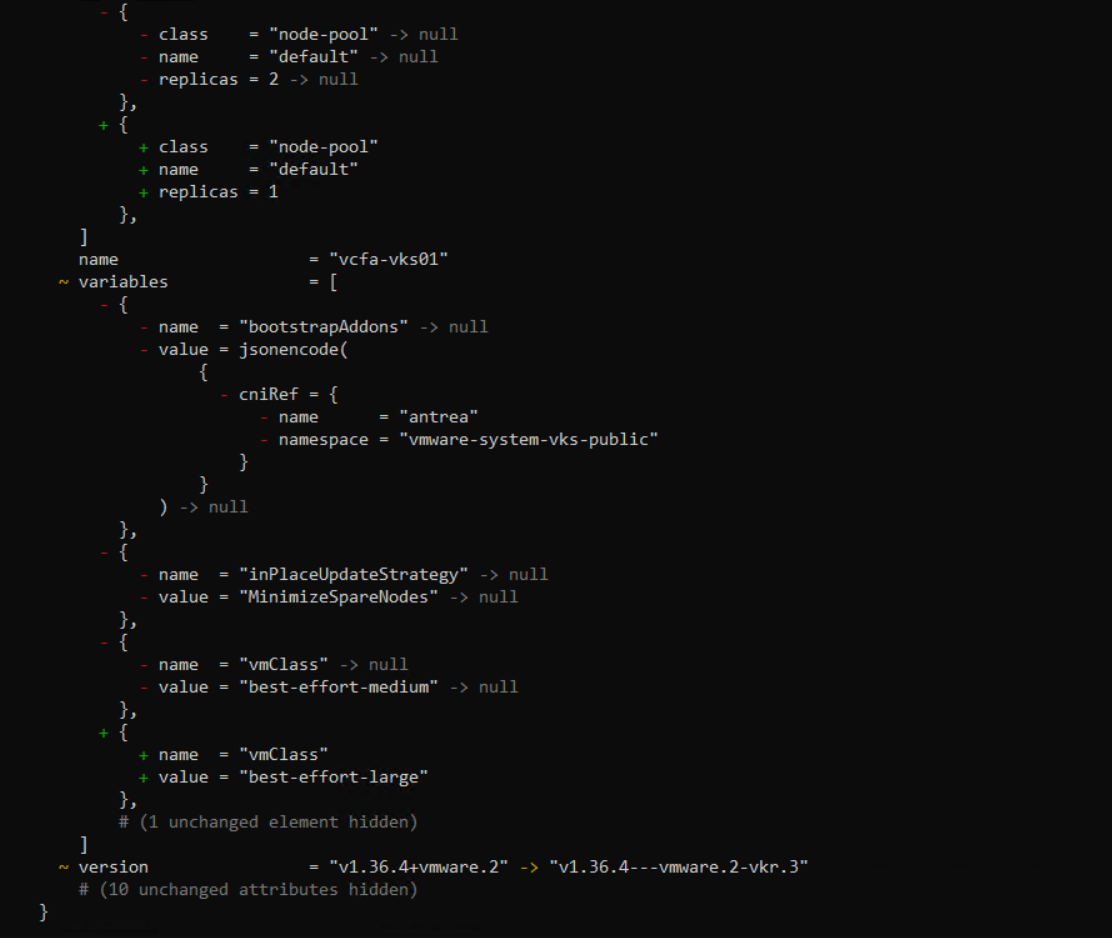
The vcfa provider reconciles the node pool replica count and updates vmClass in place.
Complete Terraform Manifest Examples
Below are the complete reference manifests for both providers so you can test and compare them in your own VCF Automation 9 environment.
Shared Provider Configuration (Both Providers)
provider.tf
|
terraform {
required_providers {
kubernetes = {
source = “hashicorp/kubernetes”
}
vcfa = {
source = “vmware/vcfa”
}
}
}
provider “vcfa” {
url = “https://${var.vcfa_url}”
allow_unverified_ssl = var.vcfa_insecure
org = var.vcfa_organization
auth_type = “api_token”
api_token = var.vcfa_refresh_token
}
data “vcfa_kubeconfig” “kubeconfig” {
project_name = var.project_name
supervisor_namespace_name = var.supervisor_namespace_name
}
provider “kubernetes” {
host = data.vcfa_kubeconfig.kubeconfig.host
insecure = data.vcfa_kubeconfig.kubeconfig.insecure_skip_tls_verify
token = data.vcfa_kubeconfig.kubeconfig.token
}
|
Manifests for the kubernetes Provider
main.tf (kubernetes provider)
|
data “kubernetes_resource” “kubernetes_cluster_release” {
api_version = “kubernetes.vmware.com/v1alpha1”
kind = “KubernetesRelease”
metadata {
name = var.kubernetes_cluster_release_name # e.g., “v1.36.4—vmware.2-vkr.3”
}
}
resource “kubernetes_manifest” “kubernetes_cluster” {
depends_on = [
data.kubernetes_resource.kubernetes_cluster_release,
]
manifest = {
“apiVersion” = “cluster.x-k8s.io/v1beta2”
“kind” = “Cluster”
“metadata” = {
“name” = var.kubernetes_cluster_name
“namespace” = var.supervisor_namespace_name
“labels” = {
“kubernetes-cluster-selector” = var.kubernetes_cluster_name
}
}
“spec” = {
“clusterNetwork” = {
“pods” = {
“cidrBlocks” = [var.kubernetes_cluster_network_pods_cidr_block]
}
“services” = {
“cidrBlocks” = [var.kubernetes_cluster_network_services_cidr_block]
}
“serviceDomain” = var.kubernetes_cluster_network_service_domain
}
“topology” = {
“classRef” = {
“name” = var.kubernetes_cluster_class_name
“namespace” = “vmware-system-vks-public”
}
“controlPlane” = {
“replicas” = var.kubernetes_cluster_control_plane_replicas
}
“variables” = [
{
“name” = “vmClass”
“value” = var.kubernetes_cluster_topology_vm_class_name
},
{
“name” = “storageClass”
“value” = var.kubernetes_cluster_topology_vm_storage_class
},
{
“name” = “inPlaceUpdateStrategy”
“value” = “MinimizeSpareNodes”
},
{
“name” = “kubernetes”
“value” = {
“certificateRotation” = {
“enabled” = true
“renewalDaysBeforeExpiry” = var.kubernetes_cluster_certificate_rotation_days
}
}
},
{
“name” = “bootstrapAddons”
“value” = {
“cniRef” = {
“name” = “antrea”
“namespace” = “vmware-system-vks-public”
}
}
}
]
“version” = data.kubernetes_resource.kubernetes_cluster_release.object.spec.kubernetes.version
“workers” = {
“machineDeployments” = [
{
“class” = “node-pool”
“name” = var.kubernetes_cluster_name
“replicas” = var.kubernetes_cluster_workers_replicas
“variables” = {
“overrides” = [
{
“name” = “vmClass”
“value” = var.kubernetes_cluster_topology_vm_class_name
}
]
}
}
]
}
}
}
}
}
|
variables.tf (kubernetes provider)
|
variable “vcfa_url” {
description = “Fully qualified domain name or IP of the VCFA instance (without https://)”
type = string
}
variable “vcfa_insecure” {
description = “Allow insecure SSL connections (set to true for self-signed certificates)”
type = bool
default = false
}
variable “vcfa_organization” {
description = “Target organization name in VCFA”
type = string
}
variable “vcfa_refresh_token” {
description = “API / Refresh token for authenticating to the VCFA endpoint”
type = string
sensitive = true
}
variable “project_name” {
description = “VCFA project”
type = string
}
variable “supervisor_namespace_name” {
description = “Name of the vSphere Supervisor namespace hosting the cluster resources.”
type = string
}
####################### VKS Cluster
variable “kubernetes_cluster_release_name” {
description = “Name of the VKS Cluster Release”
type = string
}
variable “kubernetes_cluster_name” {
description = “Name of the VKS cluster.”
type = string
}
variable “kubernetes_cluster_class_name” {
description = “ClusterClass name used for topology definition.”
type = string
default = “tkg-cluster-class”
}
variable “kubernetes_cluster_topology_vm_class_name” {
description = “VirtualMachineClass name for control plane and worker nodes.”
type = string
}
variable “kubernetes_cluster_topology_vm_storage_class” {
description = “Storage class assigned to cluster topology disks.”
type = string
}
variable “kubernetes_cluster_control_plane_replicas” {
description = “Number of control plane nodes.”
type = number
default = 3
}
variable “kubernetes_cluster_workers_replicas” {
description = “Number of worker nodes in the default machine deployment.”
type = number
default = 3
}
variable “kubernetes_cluster_network_pods_cidr_block” {
description = “CIDR block allocated for Pods.”
type = string
default = “192.168.0.0/16”
}
variable “kubernetes_cluster_network_services_cidr_block” {
description = “CIDR block allocated for Services.”
type = string
default = “10.96.0.0/12”
}
variable “kubernetes_cluster_network_service_domain” {
description = “Cluster internal DNS domain.”
type = string
default = “cluster.local”
}
variable “kubernetes_cluster_certificate_rotation_days” {
description = “Number of days before expiry to initiate cluster certificate renewal.”
type = number
default = 30
}
|
terraform.tfvars (kubernetes provider)
|
# Provide the host FQDN/IP only (the provider config prefixes ‘https://’ automatically)
vcfa_url = “<VCFA FQDN>”
# Set to true if your VCFA instance uses self-signed or internal CA certs
vcfa_insecure = true
# Your target VCFA Organization name
vcfa_organization = “<VCFA ORG>”
# User API token generated from your VCFA profile
vcfa_refresh_token = “<VCFA REFRESH TOKEN>”
# VCFA Project the resource will be created for
project_name = “<VCFA PROJECT>”
# Supervisor namespace (in VCFA) where this resource will be created in
supervisor_namespace_name = “<VCFA NAMESPACE>”
################# VKS Cluster
kubernetes_cluster_class_name = “builtin-generic-v3.7.0”
kubernetes_cluster_release_name = “v1.36.4—vmware.2-vkr.3” # e.g. “v1.28.2—vmware.1-tkg.1”
kubernetes_cluster_topology_vm_class_name = “best-effort-medium”
kubernetes_cluster_topology_vm_storage_class = “<STORAGE CLASS>”
kubernetes_cluster_control_plane_replicas = 1
kubernetes_cluster_workers_replicas = 1
kubernetes_cluster_network_pods_cidr_block = “192.168.0.0/16”
kubernetes_cluster_network_services_cidr_block = “10.96.0.0/12”
kubernetes_cluster_network_service_domain = “cluster.local”
kubernetes_cluster_certificate_rotation_days = 30
|
Manifests for the vcfa Provider
main.tf (vcfa provider)
|
resource “vcfa_vks_cluster” “vks_prod_cluster” {
context = {
project = var.project_name
namespace = var.supervisor_namespace_name
}
name = var.vks_cluster_name
labels = var.vks_labels
annotations = var.vks_annotations
cluster_class = {
name = var.vks_cluster_class
}
version = var.vks_k8s_version
cluster_network = {
services = {
cidr_blocks = var.vks_service_cidr_blocks
}
}
variables = var.vks_cluster_variables
control_plane = {
replicas = var.vks_control_plane_replicas
}
machine_deployments = var.vks_machine_deployments
}
|
variables.tf (vcfa provider)
|
variable “vcfa_url” {
description = “Fully qualified domain name or IP of the VCFA instance (without https://)”
type = string
}
variable “vcfa_insecure” {
description = “Allow insecure SSL connections (set to true for self-signed certificates)”
type = bool
default = false
}
variable “vcfa_organization” {
description = “Target organization name in VCFA”
type = string
}
variable “vcfa_refresh_token” {
description = “API / Refresh token for authenticating to the VCFA endpoint”
type = string
sensitive = true
}
variable “project_name” {
description = “VCFA project”
type = string
}
variable “supervisor_namespace_name” {
description = “Name of the vSphere Supervisor namespace hosting the cluster resources.”
type = string
}
####################### VKS Cluster
variable “vks_cluster_name” {
description = “Name of the VKS Cluster”
type = string
}
variable “vks_labels” {
description = “Labels for the Kubernetes Cluster”
type = map(string)
default = {}
}
variable “vks_annotations” {
description = “Annotations for the Kubernetes Cluster”
type = map(string)
default = {}
}
variable “vks_cluster_class” {
description = “Name of ClusterClass”
type = string
}
variable “vks_k8s_version” {
description = “Kubernetes Version of Cluster”
type = string
}
variable “vks_service_cidr_blocks” {
description = “CIDR blocks for Kubernetes Services”
type = list(string)
default = [“10.96.0.0/12”]
}
variable “vks_cluster_variables” {
description = “Cluster-specific variables (e.g., vmClass, storageClass)”
type = list(object({
name = string
value = string
}))
}
variable “vks_control_plane_replicas” {
description = “Number of replicas for control plane (1 for Non-HA, 3 for HA)”
type = number
default = 1
}
variable “vks_machine_deployments” {
description = “Definition of worker node pools (Machine Deployments)”
type = list(object({
name = string
class = string
replicas = number
}))
}
|
terraform.tfvars (vcfa provider)
|
# Provide the host FQDN/IP only (the provider config prefixes ‘https://’ automatically)
vcfa_url = “<VCFA FQDN>”
# Set to true if your VCFA instance uses self-signed or internal CA certs
vcfa_insecure = true
# Your target VCFA Organization name
vcfa_organization = “<VCFA ORG NAME>”
# User API token generated from your VCFA profile
vcfa_refresh_token = “<VCFA REFRESH TOKEN>”
# VCFA Project the resource will be created for
project_name = “<VCFA PROJECT>”
# Supervisor namespace (in VCFA) where this resource will be created in
supervisor_namespace_name = “<VCFA NAMESPACE>”
################# VKS Cluster
vks_labels = {
“env” = “production”
“managed-by” = “terraform”
}
vks_annotations = {
“owner” = “platform-team”
}
vks_cluster_class = “builtin-generic-v3.7.0”
vks_k8s_version = “v1.36.4—vmware.2-vkr.3”
vks_service_cidr_blocks = [
“10.96.0.0/12”
]
vks_cluster_variables = [
{ name = “vmClass”, value = “best-effort-medium” },
{ name = “storageClass”, value = “<STORAGE CLASS>” }
]
vks_control_plane_replicas = 1
vks_machine_deployments = [
{
name = “default”
class = “node-pool”
replicas = 1
}
]
|
Christian has joined VMware in July 2015 as Senior Systems Engineer Cloud Management. Through his work in various cloud projects before and at VMware he has gained experience in datacenter, server, storage, networking and cloud management technologies. Today his primary focus is on automation and operation topics with integration into many surrounding solutions like containers, configuration management, directory services and others. He is responsible for the management components in the VMware Cloud Foundation (VCF) product family for enterprise customers in Germany.
Latest posts by Christian Ferber
(see all)


