


VCF Automation 9 introduced 2 types of organizations: VM-Apps-Organization and All-Apps-Organization. The VM-Apps-Organization is almost identical to the 8.x version of Aria Automation and can use the embedded or an external Orchestrator. The All-Apps-Organization is a completely new architecture which relies on Kubernetes APIs. It can use Orchestrator for extensibility, custom resources and other functions similar to 8.x, however it only works with an external Orchestrator. Each All-Apps-Org must have its own external Orchestrator which guarantees tenant isolation. In this blog I will cover the steps required to establish an external Orchestrator installation in an All-Apps-Org.
Download and Deployment
In VCF 9 the external Orchestrator is no managed solution. This means it must be downloaded manually from the Broadcom download portal. After this step has been done, it will be imported as OVA into the vCenter. Potentially this can be another vCenter as well as long as the network communication is given.
The deployment is straight forward. However I would recommend not to specify an NTP server during the OVA deployment as the services might not come up after the installation.
Update VCF 9.1: This bug has been fixed by VCF Operations Orchestrator 9.1. With that version you are save to specify the NTP servers already during OVA deployment.
Once the deployment is done you can set the NTP server(s) through the command line interface:
vracli ntp systemd --set <ntp1>,<ntp2>and verify its setting with:
vracli ntp show-config
The Orchestrator might not show a graphical UI at this point in time. Make sure you walk through the next step of configuring authentication before trying to access the UI.
Configuring Authentication
VCF Operations Orchestrator requires an external authentication mechanism. This can be vCenter, IDM, VCF Automation or vRealize/Aria Automation.
To configure the authentication for VCF Automation, following procedure is required which is also documented here:
On Orchestrator CLI run:
vracli vro authentication set -p tm -u <admin account provider org> -hn https://<fqdn VCF automation> --tenant <org name for All-Apps-Org>As pre-requisite an All-Apps-Org must be present on the platform. In the command above use the admin account of the service provider (system), provide the FQDN of the automation appliance (or load balancer) and the name of the All-Apps-Org.
This command activates the configuration and enables the authentication service:
/opt/scripts/deploy.shIntegrate VCF Operations Orchestrator with VCF Automation
Going forward, the Orchestrator needs to be configured as integration in the All-Apps-Org. For this procedure login to the All-Apps-Org and go to Administer à Integrations. The settings should be self-explanatory pointing to the FQDN of the Orchestrator appliance. There are no credentials required as the authentication is done through VCF Automation like configured before.
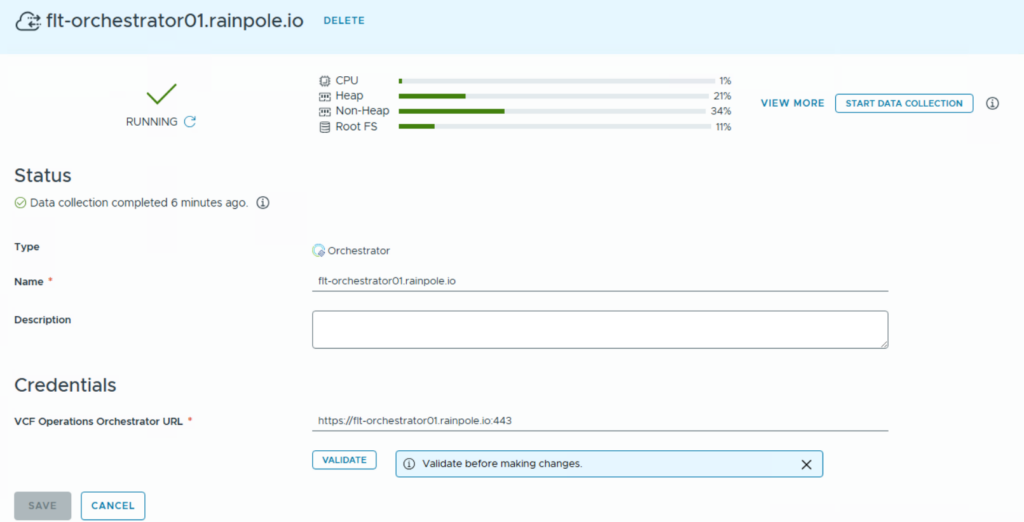
Also note that in this interface you will be able to run a data collection manually e.g. if you want Automation to detect a new Orchestrator workflow.
Apply Rights Bundle
VCF Automation 9 comes with a new capability that supports rights bundles which can be added by external components. In fact, this means an external solution can add permissions to the system which are tailored for its purpose, and which can be assigned to Automation roles.
VCF Operations Orchestrator requires specific permissions to be added. If you wouldn’t do that configuration, only the provider admin is able to leverage the Orchestrator within the All Apps tenant. Every other user would not see the menu items – even if he has Administrator privileges.
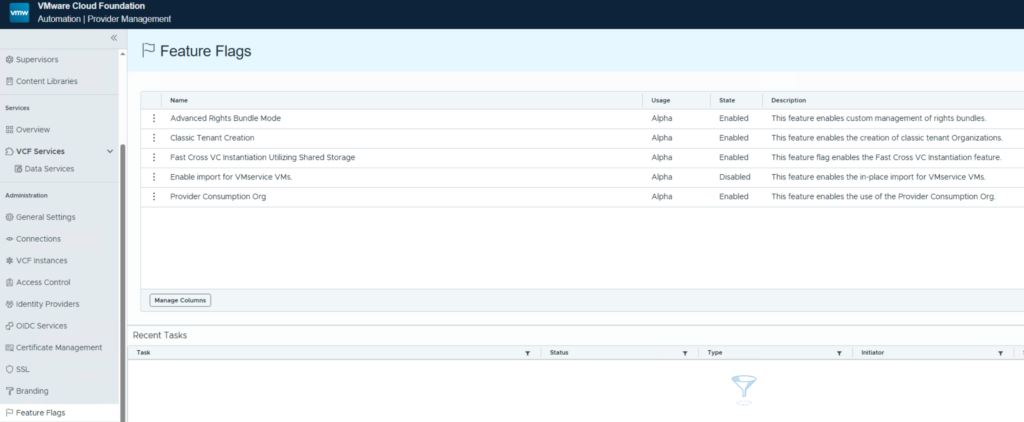
As first step you need to enable “Advanced Rights Bundles” in general. This is done in the provider (system) tenant in the Feature Flags section:
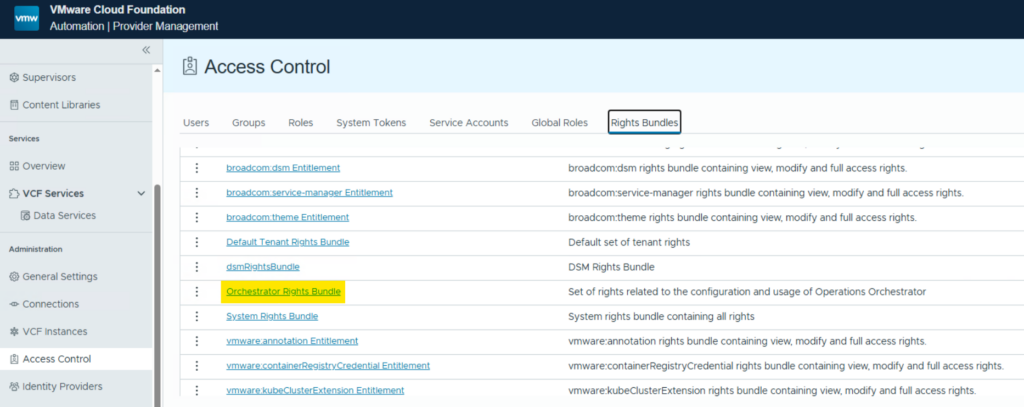
Second you will find an “Orchestrator Rights Bundle” in the Access Control -> Rights Bundles tab in the provider (system) tenant.
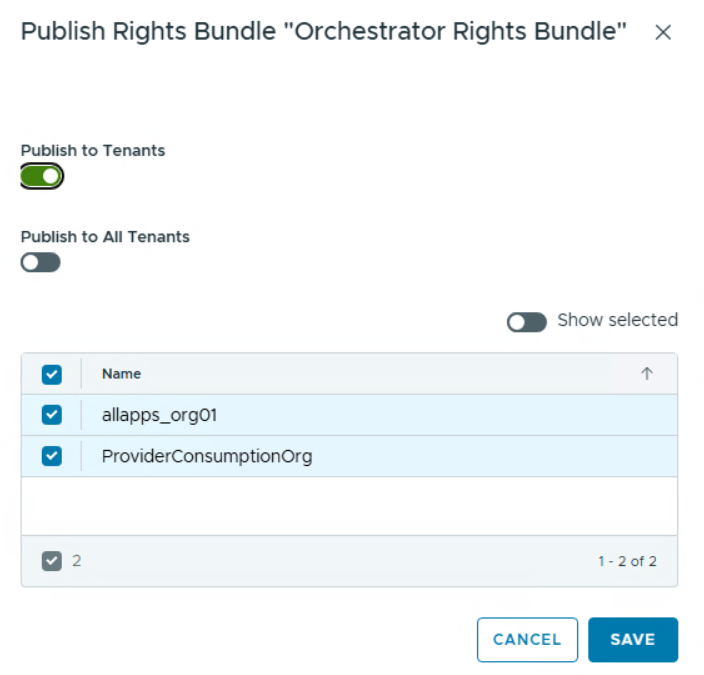
This bundle by default is published to the Provider Consumption Org only (if enabled). With the publishing function you can then make it available to other orgs as well:

Testing the installation
If all steps have been completed successfully, you will see the Orchestrator tab being populated in the All-Apps-Org. Now you can leverage it for extensibility, custom resources, custom form actions and more.
Have fun!

- VCF Automation 9 – Present Kubernetes labels as dropdown - 18. August 2026
- VCF 9 – Automated Offline Depot Server Creation - 19. May 2026
- VCF Automation 9 – Content Libraries - 18. May 2026
Thank You Christian! I found the documentation but was not having much luck, your examples helped a great deal!
Pingback: What VCF Automation Is: The Product Formerly Known as vRealize Automation, in VCF 9 (VCF Automation Series, Part 1) – Dr. Pranay Jha