


My peer Christian Liebner has already created a blog related to external-dns. While he is focussing on External-DNS as supervisor service and its benefit for VM deployments, this blog here has a deeper look into the the more generic capabilities of External-DNS for VKS Clusters.
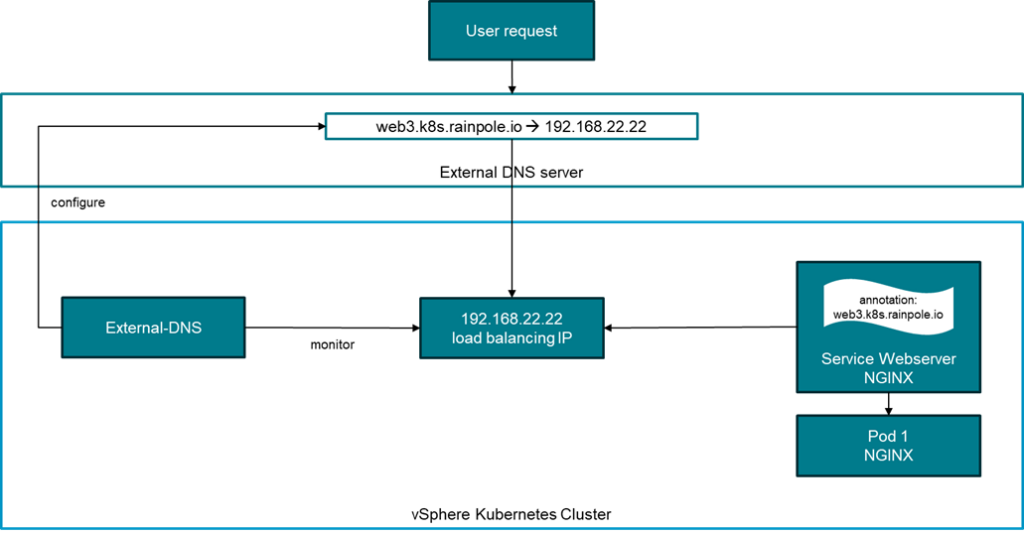
So, what is external-dns (sometimes also referred to as ExtDNS)? First, it’s a Kubernetes-based service which runs on a Kubernetes cluster. It monitors services deployed on the cluster with regards to DNS names with which these services should be accessible. Once it found a new service, it automatically creates the required DNS entry in an externals DNS server (like Windows DNS). It can also handle removal of entries if the service is not deployed anymore.
This blog shows a very simple example, how a demo deployment of external-dns can be set up.
Pre-requisites for a demo setup
Following preparations need to be done for a demo setup
- Working vSphere Supervisor configuration (here including VCF Automation with an all-apps-org leveraging the supervisor cluster)
- Deployed VKS Cluster (I am using the same cluster as for the Contour documentation)
- Install VCF CLI, add the context of the VKS cluster and switch to it (process explained here)
- Windows DNS server with a dedicated zone
I have been using a Windows 2019 DNS server with a dedicated zone called k8s.rainpole.io.
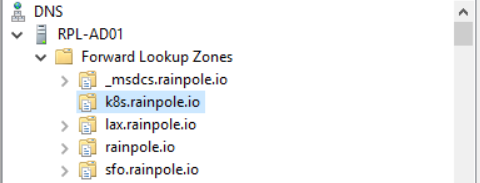
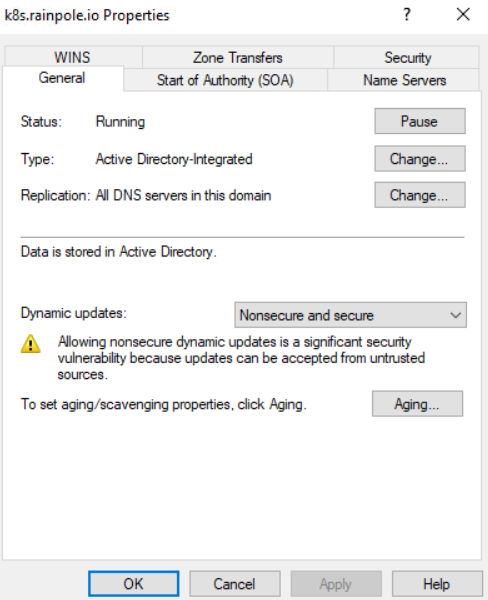
There are 2 configurations needed for the DNS zone in our example. Non-secure updates as well as zone transfers must be enabled. If you want a more secure handling this can be done but requires more comprehensive certificate handling. The zone transfer is primarily needed to allow for removal of entries as well. If you want to only add entries, it might not be necessary.
Installation of external-dns
VKS Clusters can use the vcf packaging mechanism to install additional services. For external-dns there is a related documentation available.
Let me walk through the process like I used it in this example.
Add a package repository to the configuration (make sure you switched to the context of the Kubernetes cluster before by this process).
The URL for the package repository can be retrieved from the release notes of the VKS release.
vcf package repository add broadcom-standard-repo --url projects.packages.broadcom.com/vsphere/supervisor/packages/2025.10.22/vks-standard-packages:3.5.0-20251022 -n tkg-systemList the available packages:
vcf package available list -n tkg-systemRetrieve the available versions for external-dns:
vcf package available get external-dns.kubernetes.vmware.com -n tkg-systemCreate a default data value file (configuration file) for external-dns:
vcf package available get external-dns.kubernetes.vmware.com/0.18.0+vmware.1-vks.1 --default-values-file-output external-dns-data-values.yamlI prepared a working configuration for external-dns. Replace the created yaml file with it and modify its parameters based on your environment.
deployment:
  args:
  - --registry=txt
  - --txt-prefix=ext-dns-in-vks-
  - --txt-owner-id=k8s
  - --log-level=debug
  - --provider=rfc2136
  - --rfc2136-host=10.11.10.4
  - --rfc2136-port=53
  - --rfc2136-zone=k8s.rainpole.io
  - --rfc2136-insecure
  - --rfc2136-tsig-axfr
  - --domain-filter=k8s.rainpole.io
  - --policy=sync
  - --source=service
namespace: external-dns-ns
Let me explain some of the parameters:
|
– –rfc2136-host |
IP address or host name of the Windows DNS server |
|
– –rfc2136-port |
Standard port of the DNS server |
|
– –rfc2136-zone |
DNS zone created for external-dns |
|
– –rfc2136-insecure |
Allow for insecure updates |
|
– –rfc2136-tsig-axfr |
Required for zone transfers which are relevant for deletion of entries |
|
– –policy=sync |
Entries are added and deleted |
|
– –source=service |
external-dns listens for services of type loadbalancer |
Next create a namespace for external-dns:
kubectl create ns external-dns-ns Allow for proper execution:
kubectl label namespace external-dns-ns pod-security.kubernetes.io/enforce=privilegedInstall external-dns with the appropriate version and the data values file:
vcf package install external-dns -p external-dns.kubernetes.vmware.com --version 0.18.0+vmware.1-vks.1 --namespace external-dns-ns --values-file external-dns-data-values.yaml Deploy an application
Now that external-dns has been installed you need an application that creates a service which requires a dns name. In my example I used a simple NGINX application (similar as in the Contour example). The primary modification is that I am using a service type LoadBalancer which includes an annotation that specifies the DNS name to be used.
apiVersion: v1
kind: Namespace
metadata:
  name: nginx-web3
---
apiVersion: v1
kind: ConfigMap
metadata:
  name: nginx-html-config
  namespace: nginx-web3
data:
  index.html: |
    <html>
    <head>
      <style>
        body { font-family: sans-serif; text-align: center; margin-top: 50px; }
        .highlight { color: #964b00; font-weight: bold; }
      </style>
    </head>
    <body>
      <h1>Status: Online</h1>
      <p>The current environment is: <span class="highlight">Web 3 Brown</span></p>
    </body>
    </html>
---
apiVersion: apps/v1
kind: Deployment
metadata:
  name: nginx-web3
  namespace: nginx-web3
spec:
  replicas: 1
  selector:
    matchLabels:
      app: nginx-vks
  template:
    metadata:
      labels:
        app: nginx-vks
    spec:
      securityContext:
        runAsNonRoot: true
        runAsUser: 101
        runAsGroup: 101
        fsGroup: 101
        seccompProfile:
          type: RuntimeDefault
      containers:
      - name: nginx
        image: nginxinc/nginx-unprivileged:stable-alpine
        ports:
        - containerPort: 8080
        # Mounting config map to replace index.html
        volumeMounts:
        - name: html-volume
          mountPath: /usr/share/nginx/html/index.html
          subPath: index.html
        securityContext:
          allowPrivilegeEscalation: false
          capabilities:
            drop:
              - ALL
        resources:
          limits:
            cpu: 100m
            memory: 128Mi
          requests:
            cpu: 50m
            memory: 64Mi
      volumes:
      - name: html-volume
        configMap:
          name: nginx-html-config
---
apiVersion: v1
kind: Service
metadata:
  name: nginx-vks-service
  namespace: nginx-web3
  annotations:
    external-dns.alpha.kubernetes.io/hostname: web3.k8s.rainpole.io
spec:
  selector:
    app: nginx-vks
  ports:
    - protocol: TCP
      port: 80
      targetPort: 8080
  type: LoadBalancer
Save the file nginx-web3.yaml and run it with:
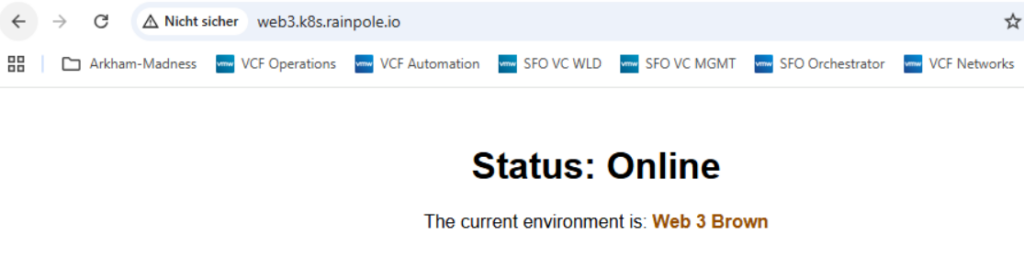
kubectl apply -f nginx-web3.yamlIf the NGINX web server comes up, you should see that a DNS entry “web3.k8s.rainpole.io” is created and the service is available through a browser connection. Similarly, the entry will be removed after the service has been deleted.
External-DNS with Contour
This section refers to the configuration used in my other blog about VKS and Contour. Wouldn’t it be good to auto-create DNS entries for a configuration with an ingress controller as well? External-dns can also use the Kubernetes ingress kind or Contour HTTPProxy as configuration source.
Just add 2 parameters to the external-dns-data-values.yaml file:
- --source=ingress
- --source=contour-httpproxy
To enable the new configuration in a VKS cluster environment you simply must re-run the installation command:
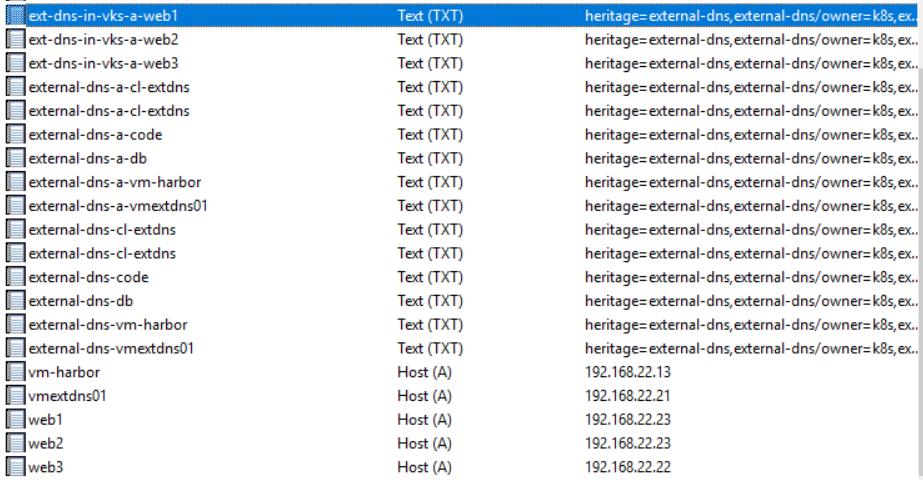
vcf package install external-dns -p external-dns.kubernetes.vmware.com --version 0.18.0+vmware.1-vks.1 --namespace external-dns-ns --values-file external-dns-data-values.yamlThere is no specific annotation for the actual services needed (in this example nginx-web1 and nginx-web2) as external-dns takes the FQDN parameter from the virtualhost parameter. Once the configuration is applied and the services are active you should see the new DNS entries being populated in the DNS server. Also note “ext-dns-in-vks-a-web1” TXT entries which external-dns creates to document its ownership of the entries. The naming of these entries is derived from the “txt-prefix” parameter.

- VCF 9 – Management Domain with vSphere 8 - 1. April 2026
- VCF 9 – VKS Clusters with External-DNS - 19. February 2026
- VCF 9 – VKS Clusters with Contour - 16. February 2026