


So, you proudly wired up your VCF 9 environment to an Identity Broker, hit save, and thought:
“Nice, job done.”
But then you realize… you just pointed your shiny Los Angeles VCF instance at the San Francisco Identity Broker. Oops.

Now every time you try to configure Identity Broker in LA, it just kicks you over to SF’s config page. And guess what? There’s no big shiny “Unjoin” button waiting for you.
Classic. 🙃
But don’t worry… I’ve been there, clicked all the wrong buttons, and lived to tell the tale. Here’s how to actually get yourself out of this mess.
Here’s what I did to solve it (jump to Step 5 if you just want the answer)
Step 1: Panic (It’s Mandatory)
Click around frantically in the GUI. Check Identity & Access Management in SDDC Manager. Check vCenter. Double-check again.
Nothing. No way to unjoin. Just the cold reality that LA is permanently linked to SF.
Step 2: Try to Edit the Source (Spoiler: Nope 😊)
Your brain says: “Surely I can just edit the Identity Source, right?”
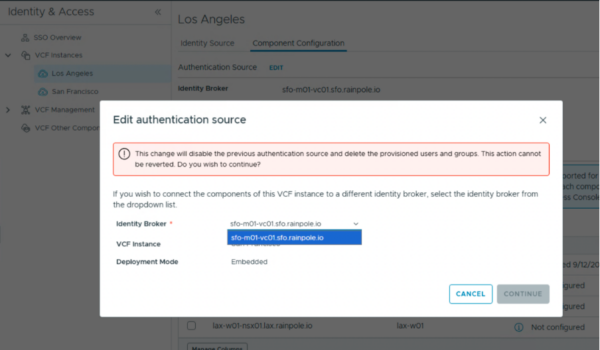
Nope. The only thing staring back at you is the existing config you don’t want.
Step 3: Go Full Detective Mode 🔍
Crack open the SDDC Manager API docs. Search through the SDK. Surely somewhere there’s an API call to reset or unjoin Identity Broker.
Bad news: all the old SDDC Manager APIs for Identity Broker are deprecated. They don’t actually work anymore – everything just punts you over to vCenter instead.
Step 4: Get Angry and Reset SSO (Not Recommended 😅)
At this point, you’re done being reasonable. So you torch the entire SSO config in the San Francisco broker.
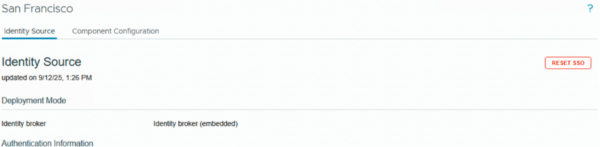
In my lab, this was fine… I can break things and just rebuild them. But in production? Yeah, not such a great idea.
Yes, it technically worked… but it also meant I had to reconfigure the SF Identity Broker afterward. Definitely not the cleanest solution.
Step 5: Breathe (and Actually Fix It)
Here’s the real trick:
-
Go to Component Configuration in SDDC Manager.

-
Unconfigure all the components tied to the wrong Identity Broker.
-
Once cleared, the system happily presents you with two fresh options:
-
Join an Identity Broker
-
Create a New One
-
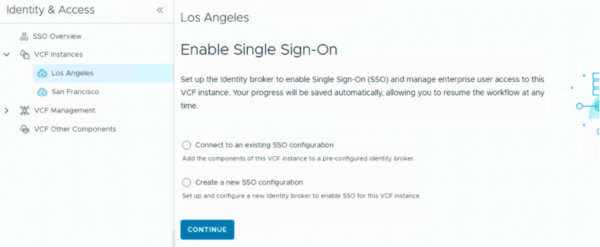
And just like that, you’re free to reconfigure correctly. 🎉
TL;DR
-
Joined the wrong Identity Broker? Don’t panic.
-
Don’t nuke your SSO config unless you really like pain.
-
The right way: unconfigure from Component Configuration.
-
You’ll get the option to rejoin or create new.
-
Life is good again. 😎
Note: If your Identity Broker service crashes, don’t waste time hunting for it in Ops or SDDC Manager – it actually runs as a service on the vCenter.
