


Thanks to Veneling Bakalov for his help!
VCF Automation 9 has multiple APIs that can be used (REST, Kubernetes). All have in common that for authentication a refresh token needs to be generated. By default, this is done through the UI where in the account properties there is the option to create a new API token which expires after 3 months. For programmatic access to VCF Automation this duration is too short and even if it was longer, customers don’t want to involve a manual process to just renew a token regularly after a period.
VCF Automation provides 2 ways to accommodate that. First there are service accounts which are intended for programmatic access, second there is also the option to programmatically request org API tokens from the provider org.
This blog will walk through both capabilities.
Service Accounts
The whole process for service accounts is described in the official documentation. However, I’d like to add more context to it. Service Accounts have a couple of advantages which is why they should be primarily used for programmatic access:
- They can’t be used for UI access
- The administrator has control over them and can revoke them any time
- Their API token does not expire and will be renewed on each request
- The token is bound to a device ID
Create a Service Account
The first step is to create a service account in the VCFA user interface. Be aware that there are service accounts in the provider context as well as in every org. I will focus on an all-apps-org in this example.
During creation of a service account, you need to assign the role this api access is being granted for and create a Software ID which represents the actual application. For the latter you could define your own ID but I’d recommend using the auto-create functionality. The other parameters are optional and can be considered metadata for the respective application.
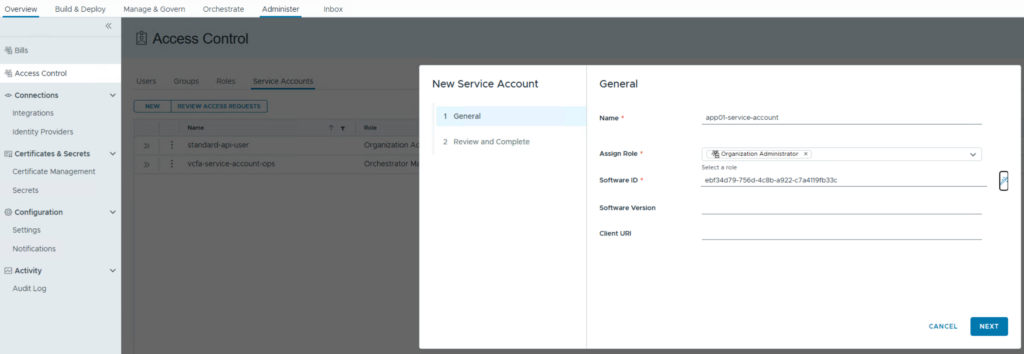
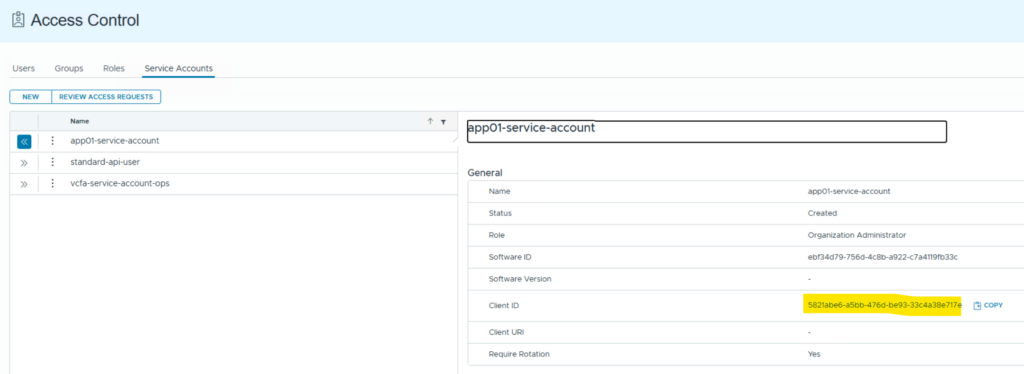
Once done there is a Client ID created which is required in the subsequent requests. Note the status of the service account is “created”.
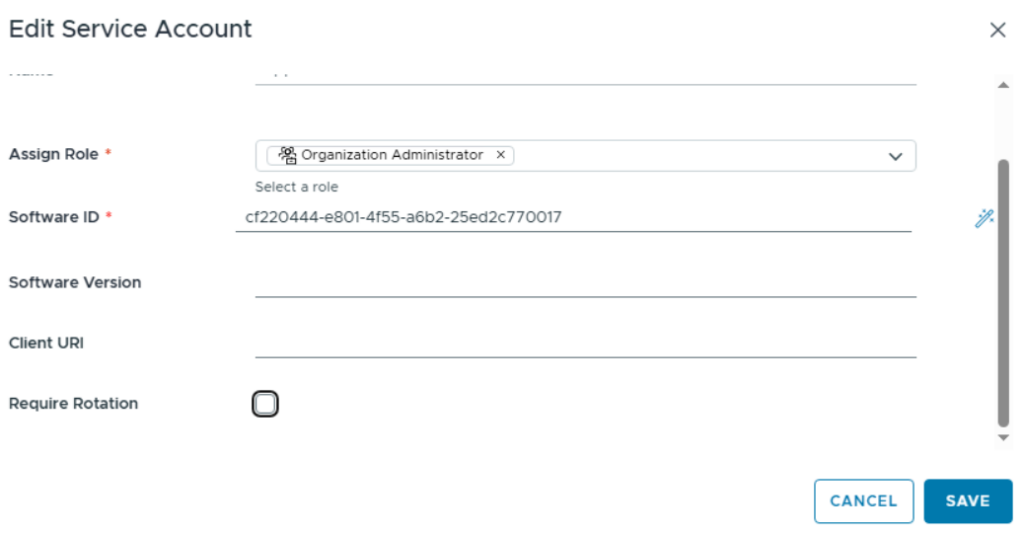
Disable “Require Rotation” (optional)
Service accounts by default are configured for “Require Rotation”. This means that after each request for a bearer token (see below requests) the refresh token gets invalid. On bearer token request, a new refresh token is provided which must be used for subsequent requests. If you don’t want this behavior, you can disable “Require Rotation” which keeps the refresh token valid. Be aware this setting can only be changed if the service account is not active yet.
Request the user code
As next step issue a curl command which requests the user_code that is required for granting access to the service account.
Note: All subsequent requests related to my tenant “allapps_org01” which is reflected in the used URLs. You must replace this with the tenant name from your environment. If you’d like to use service accounts in the provider interface, just replace “tenant/<tenant name>” by “provider” (the official documentation shows the requests for the provider interface only)
curl -i -k -X POST "https://<AUTOMATION-FQDN>/oauth/tenant/<ORG-NAME>/device_authorization" \
     -H "Accept: application/json" \
     -H "Content-Type: application/x-www-form-urlencoded" \
     -d "client_id=5821abe6-a5bb-476d-be93-33c4a38e717e"
Response:
<headers removed>
{“device_code”:”y9XCVXpYFWkdrXd20P0oD6pB0dcY5_GOT3flTiH1cnw“,”user_code”:”DZK5-WPCP“,”verification_uri”:”https://flt-auto01.rainpole.io/automation/#/administer/access”,”expires_in”:3600,”interval”:60}
Postman

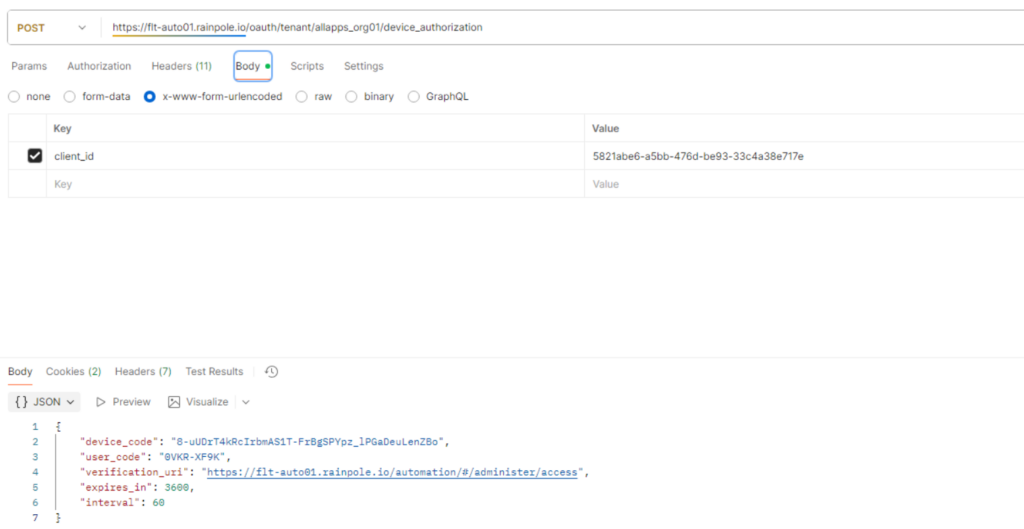
If you are issuing multiple requests, for each a user_code is generated which relates to the same Software ID and Client ID. However, each request will also get a separate device_code which is relevant for the token access. Only device_codes that have been granted can request tokens. After a grant is requested, the status of the service account changes to “requested”.
Grant Service Account access to the device
Go back to the Automation UI and select “Review Access Requests”.
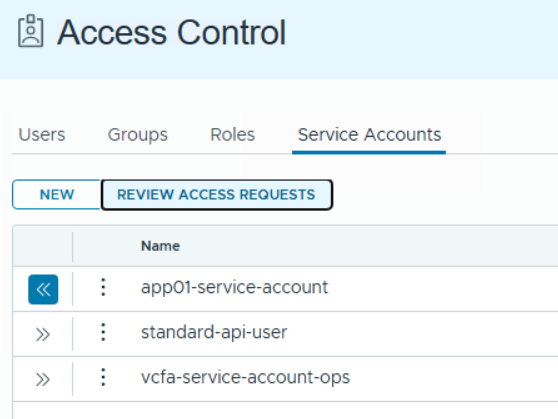
In the upcoming dialog insert the user_code and click “lookup” to retrieve the details for it. Be aware that the user_code is only valid for 1 hour.

If the user_code has been found, you can deny or grant access. The status changes to “Granted” after you grant the request.
Request tokens
The user now can request tokens from VCF Automation using the service account in a programmatic way. Replace the client_id with the one from the UI and the device_code with the response from the previous request.
curl -i -k -X POST "https://<AUTOMATION-FQDN>/oauth/tenant/<ORG-NAME>/token" \
     -H "Accept: application/json" \
     -H "Content-Type: application/x-www-form-urlencoded" \
     -d "client_id=5821abe6-a5bb-476d-be93-33c4a38e717e&grant_type=urn:ietf:params:oauth:grant-type:device_code&device_code=y9XCVXpYFWkdrXd20P0oD6pB0dcY5_GOT3flTiH1cnw"
Response:
<headers and bearer token removed>
{“access_token”:”<BEARER-TOKEN>“,”token_type”:”Bearer”,”expires_in”:3600,”refresh_token”:”sa4l1JVB0lvMBJXgWKh1jOeUQwrQ2kpm“}
Postman
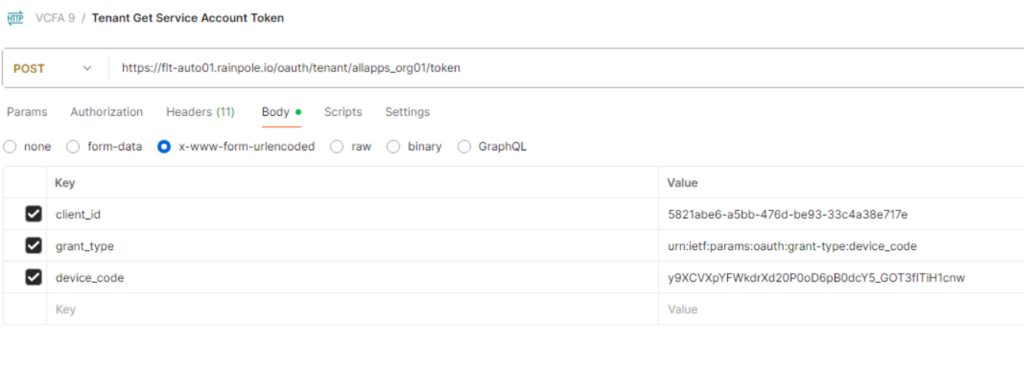
Please store your tokens in a save location as you can’t retrieve them a second time. If you lose them you must walk through the same process again.
You can now use the access_token as bearer token for immediate API requests. Be aware it expires after 1 hour (3600 seconds). After that you can use the refresh_token to generate a new access_token.
The refresh_token for service accounts does not expire (compared to UI created tokens which expire after 3 months). However, the refresh_token is invalid if one access_token (bearer token) has been generated. From this time on the new refresh_token (which is part of the response) must be used for the next request and so on. To disable this behavior, disable “Require Rotation” as explained in the related section above.
Generating a new access_token (bearer token) using the refresh_token:
curl -i -k -X POST "https://<AUTOMATION-FQDN>/oauth/tenant/<ORG-NAME>/token" \
     -H "Accept: application/*" \
     -H "Content-Type: application/x-www-form-urlencoded" \
     -d "grant_type=refresh_token&refresh_token=sa4l1JVB0lvMBJXgWKh1jOeUQwrQ2kpm"
Response:
<headers and bearer token removed>
{“access_token”:”<BEARER-TOKEN>“,”token_type”:”Bearer”,”expires_in”:3600,”refresh_token”:”qB2117Liags9zjCTU69nE24HbLZ12Bmy“}
Request Token from Provider Context
While the service account principle is the recommended way to allow external systems executing workflows in VCFA, there still might be the need to do bulk actions from the provider interface without manual user interaction.
For this there is a way to generate API tokens for orgs from the provider interface API.
As first step you need to retrieve a Bearer token in the provider interface. Just follow the VCF Automation 9 – API Access blog for details how to do that.
Retrieve the client ID for relying parties
curl -i -k -X GET "https://<AUTOMATION-FQDN>/cloudapi/1.0.0/openIdProvider/relyingParties" \
     -H "Accept: application/json;version=9.0.0" \
     -H "Authorization: Bearer <BEARER-TOKEN-PROVIDER>"
Response:
<headers removed>
{“resultTotal”:5,”pageCount”:1,”page”:1,”pageSize”:25,”associations”:null,”values”:[{“id”:”urn:vcloud:oidcRelyingParty:18f021d4-a4c5-4a9f-9c7f-6ba32332b3a6″,”clientId”:”18f021d4-a4c5-4a9f-9c7f-6ba32332b3a6“,”clientName”:”automation-relying-party“,”clientSecret”:”******”,”redirectUris”:[“https://flt-auto01.rainpole.io/blueprint-ui”,”https://flt-auto01.rainpole.io/ccs-ui”,”https://flt-auto01.rainpole.io/automation”,”https://flt-auto01.rainpole.io/automation/api-docs”,”https://flt-auto01.rainpole.io/extensibility-ui”,”https://flt-auto01.rainpole.io/provisioning-ui”,”https://flt-auto01.rainpole.io/relocation-ui”],”scope”:[“openid”,”profile”,”email”,”phone”,”groups”,”vcd_idp”],”isPublic”:true,”isPkceEnabled”:true},{“id”:”urn:vcloud:oidcRelyingParty:922f4a12-82c9-4440-8466-f1b1faca0675″,”clientId”:”922f4a12-82c9-4440-8466-f1b1faca0675″,”clientName”:”Default-IDP-Service-client”,”clientSecret”:”******”,”redirectUris”:[“”],”scope”:[“openid”,”profile”,”email”,”phone”,”groups”,”vcd_idp”],”isPublic”:true,”isPkceEnabled”:true},{“id”:”urn:vcloud:oidcRelyingParty:dfa26d00-e77f-46e2-82b9-dab22732cc42″,”clientId”:”dfa26d00-e77f-46e2-82b9-dab22732cc42″,”clientName”:”ext-o11n-15779428-b05a-481b-8b2d-e63bb8e6a1ce”,”clientSecret”:”******”,”redirectUris”:[“https://sfo-orchestrator01.sfo.rainpole.io/vco/oauth2/callback/default”],”scope”:[“openid”,”profile”,”email”,”phone”,”groups”,”vcd_idp”],”isPublic”:false,”isPkceEnabled”:false},{“id”:”urn:vcloud:oidcRelyingParty:601aeb6f-3160-4d61-a95d-4a983f395151″,”clientId”:”601aeb6f-3160-4d61-a95d-4a983f395151″,”clientName”:”lax-m01-vc01.lax.rainpole.io_7566017b-f4de-4e7c-a312-4c307dc7bf85″,”clientSecret”:”******”,”redirectUris”:[“https://192.168.24.6/wcp/pinniped/callback”],”scope”:[“openid”,”profile”,”email”,”phone”,”groups”,”vcd_idp”],”isPublic”:false,”isPkceEnabled”:false},{“id”:”urn:vcloud:oidcRelyingParty:36d974a7-34c6-4dfb-991a-b820ab93223a”,”clientId”:”36d974a7-34c6-4dfb-991a-b820ab93223a”,”clientName”:”sfo-w01-vc01.sfo.rainpole.io_0a68b5e2-7d5d-4189-a503-2583c78c8566″,”clientSecret”:”******”,”redirectUris”:[“https://192.168.20.6/wcp/pinniped/callback”],”scope”:[“openid”,”profile”,”email”,”phone”,”groups”,”vcd_idp”],”isPublic”:false,”isPkceEnabled”:false}]}
Note the client ID for relying parties.
Postman
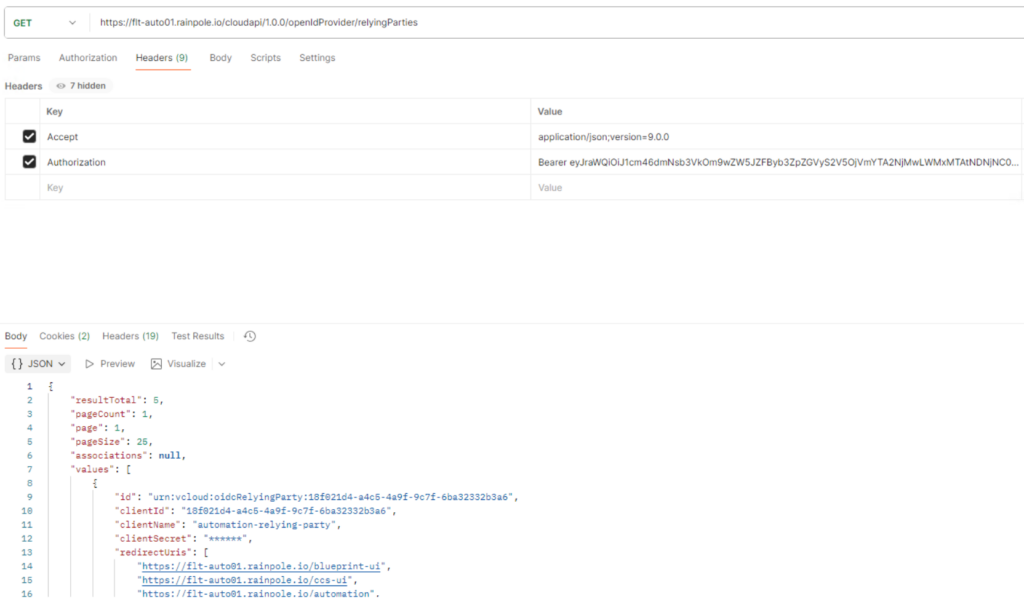
Get the Org ID
You need the org ID of the org you want to execute actions on. This can be retrieved from the UI directly or through an API call if you prefer that way:
curl -i -k -X GET "https://<AUTOMATION-FQDN>/cloudapi/1.0.0/orgs" \
     -H "Accept: application/json;version=9.0.0" \
     -H "Authorization: Bearer <BEARER-TOKEN-PROVIDER>"
Response:
<headers removed>
{“resultTotal”:7,”pageCount”:1,”page”:1,”pageSize”:25,”associations”:null,”values”:[{“id”:”urn:vcloud:org:a863dd96-6cf2-4800-9659-18752d8cd38f”,”name”:”allapps_org01″,”displayName”:”allapps_org01″,”description”:””,”isEnabled”:true,”managedBy”:{“name”:”System”,”id”:”urn:vcloud:org:a93c9db9-7471-3192-8d09-a8f7eeda85f9“},”canManageOrgs”:false,”maskedEventTaskUsername”:”system”,”directlyManagedOrgCount”:null,”isClassicTenant”:false,”isProviderConsumptionOrg”:false,”creationStatus”:”READY”},{“id”:”urn:vcloud:org:ea2584cc-f263-4b55-a02a-f698533c8010″,”name”:”allapps_org02″,”displayName”:”allapps_org02″,”description”:””,”isEnabled”:true,”managedBy”:{“name”:”System”,”id”:”urn:vcloud:org:a93c9db9-7471-3192-8d09-a8f7eeda85f9″},”canManageOrgs”:false,”maskedEventTaskUsername”:”system”,”directlyManagedOrgCount”:null,”isClassicTenant”:false,”isProviderConsumptionOrg”:false,”creationStatus”:”READY”},{“id”:”urn:vcloud:org:93abe21b-317d-43fe-a857-
…
<output truncated>
Postman
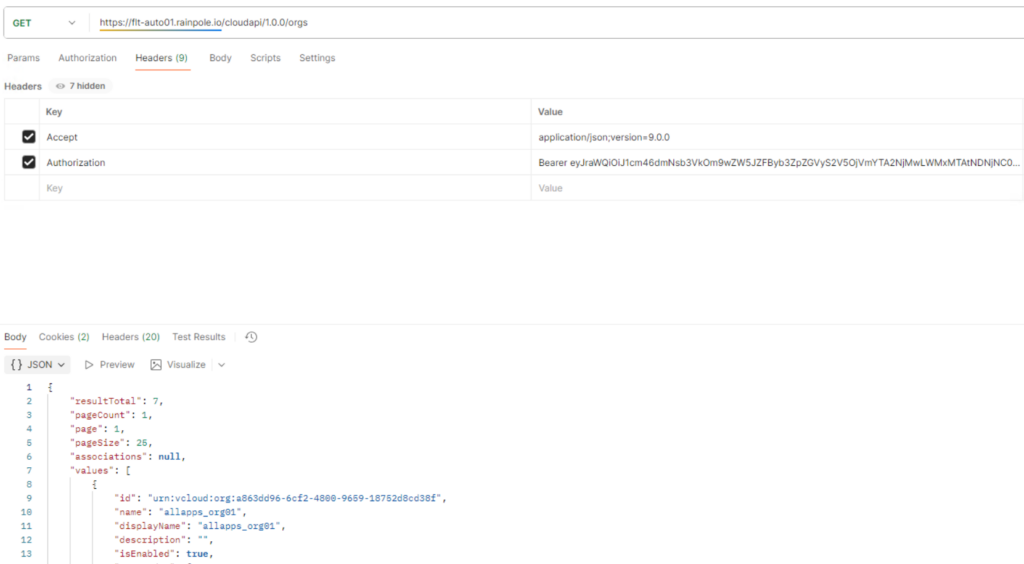
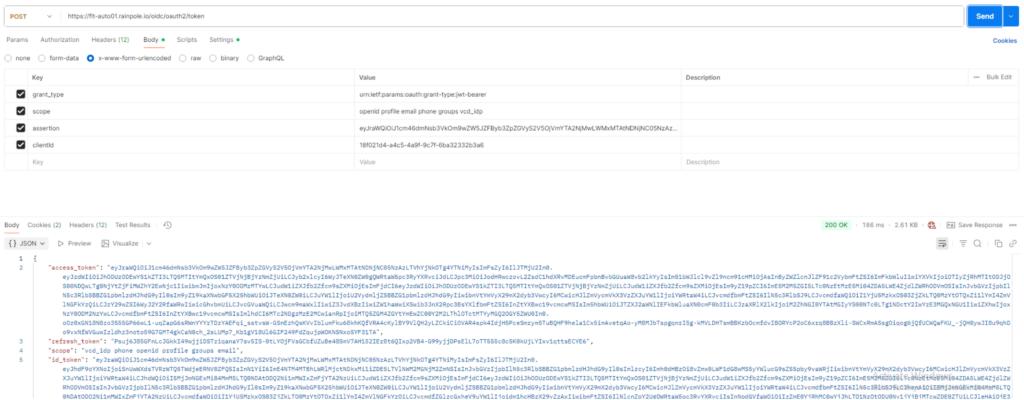
Get Token from client ID
As last step the tokens can be retrieved by using the client id and provider bearer token for the respective org. Replace the value for x-vmware-vcloud-tenant-context with the org Id and the client_id value. Both were retrieved in the previous steps.
curl -i -k -X POST "https://<AUTOMATION-FQDN>/oidc/oauth2/token" \
      -H "Accept: application/json;version=9.0.0" \
      -H "x-vmware-vcloud-tenant-context: a93c9db9-7471-3192-8d09-a8f7eeda85f9" \
      -d 'grant_type=urn:ietf:params:oauth:grant-type:jwt-bearer&scope=openid profile email phone groups vcd_idp&assertion=<BEARER-TOKEN-PROVIDER>&client_id=18f021d4-a4c5-4a9f-9c7f-6ba32332b3a6’
Response:
<headers removed>
{“access_token”:”<BEARER-TOKEN-ORG>“,”token_type”:”Bearer”,”expires_in”:3599}
Postman
Have fun!

- VCF 9 – VKS Clusters with External-DNS - 19. February 2026
- VCF 9 – VKS Clusters with Contour - 16. February 2026
- VCF Automation 9 – Accessing VKS Clusters - 30. January 2026